

Make sure you have followed the steps in this thread to ensure your private messaging and email notifications are turned on.
To arrange a match, I would advise starting a conversation (i.e. creating a new private message) with all of your team members and all of the opposing team, so that's 5 people.
That way you can start a threaded conversation with them, whereby everyone will get email notifications every time someone replies. This way hopefully you can all agree on a day and a time relatively quickly without people having to all be checking the forum daily or be in TS at the same time or keep missing each other for whatever reason seeing as we all have such different schedules.
Once a day and time has been decided - book it into the 'Events' section of the site in a 1 hour slot so that no one double books.
Here's a step by step guide to start a conversation:
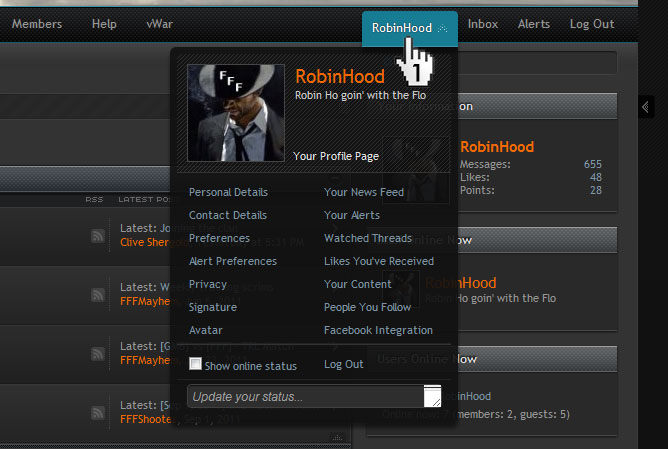
1. Click on your name in the navigation bar at the top of the page to get to your Your Account section (or just click this link http://fffsquad.com/index.php?account/ )
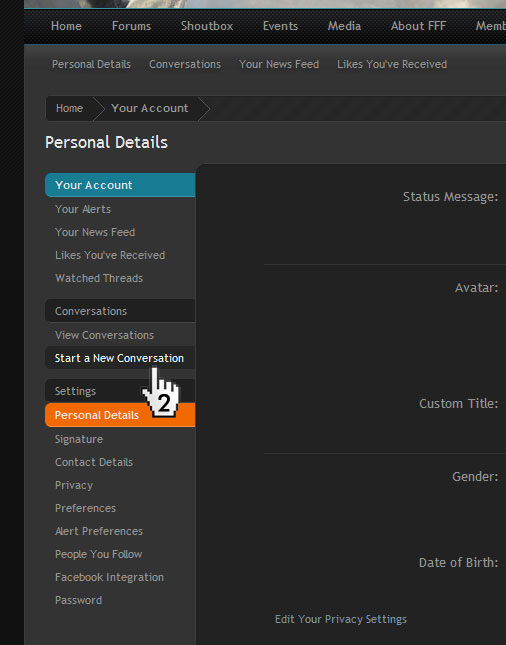
2. Click on 'start a new conversation' (or just click this link http://fffsquad.com/index.php?conversations/add )
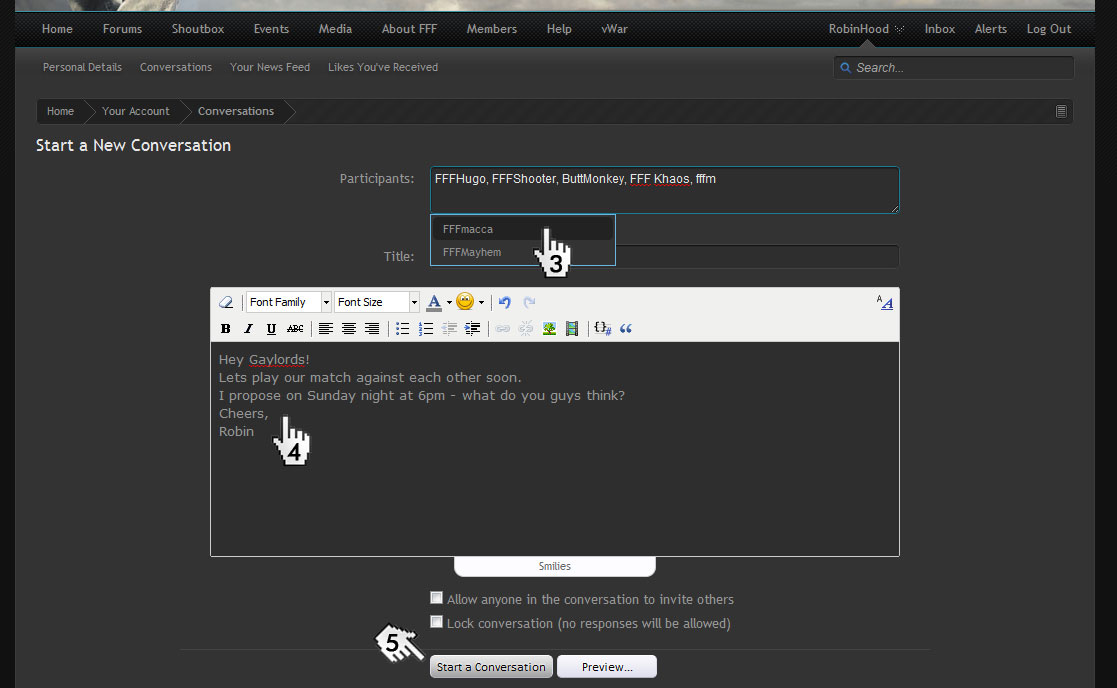
3. Address it to your 2 teamates, plus the 3 people in the opposing team. As you start to write their name a drop down box will appear, click the correct name to ensure it's entered correctly.
4. Enter your message with proposed times etc.
5. Send that bad boy!
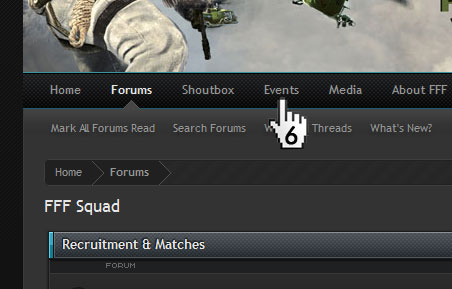
6. Once this is all done an you have decided a time, book it in the Events section of the site using a title such as Team 1 vs Team 2 and create an event, maybe include a round number if appropriate. Make sure it doesn't clash with anyone else's match.
7. Show up on time play and kick some ass!
To arrange a match, I would advise starting a conversation (i.e. creating a new private message) with all of your team members and all of the opposing team, so that's 5 people.
That way you can start a threaded conversation with them, whereby everyone will get email notifications every time someone replies. This way hopefully you can all agree on a day and a time relatively quickly without people having to all be checking the forum daily or be in TS at the same time or keep missing each other for whatever reason seeing as we all have such different schedules.
Once a day and time has been decided - book it into the 'Events' section of the site in a 1 hour slot so that no one double books.
Here's a step by step guide to start a conversation:
1. Click on your name in the navigation bar at the top of the page to get to your Your Account section (or just click this link http://fffsquad.com/index.php?account/ )
2. Click on 'start a new conversation' (or just click this link http://fffsquad.com/index.php?conversations/add )
3. Address it to your 2 teamates, plus the 3 people in the opposing team. As you start to write their name a drop down box will appear, click the correct name to ensure it's entered correctly.
4. Enter your message with proposed times etc.
5. Send that bad boy!
6. Once this is all done an you have decided a time, book it in the Events section of the site using a title such as Team 1 vs Team 2 and create an event, maybe include a round number if appropriate. Make sure it doesn't clash with anyone else's match.
7. Show up on time play and kick some ass!