So here we go again, bound to have a few teething problems while we get thing up and running. This has been updated since yesterdays post so it's worth another quick look. I believe a few of you were getting server and database errors last night and today so we've just re-imported the whole thing and everything went smoothly, so fingers crossed we're sorted on that front now. If you do have any problems please make sure you let me know by facebook or steam so we can get them fixed.
Right, I lost my intro post from last time so I'll whack it up again real quick. Some of the key features to keep an eye out for on the new site include:
Viewing all the recent threads
1. There's a box on the home page with about 5 recent threads on it for a quick glance. But for a full list where you won't miss any of them use...
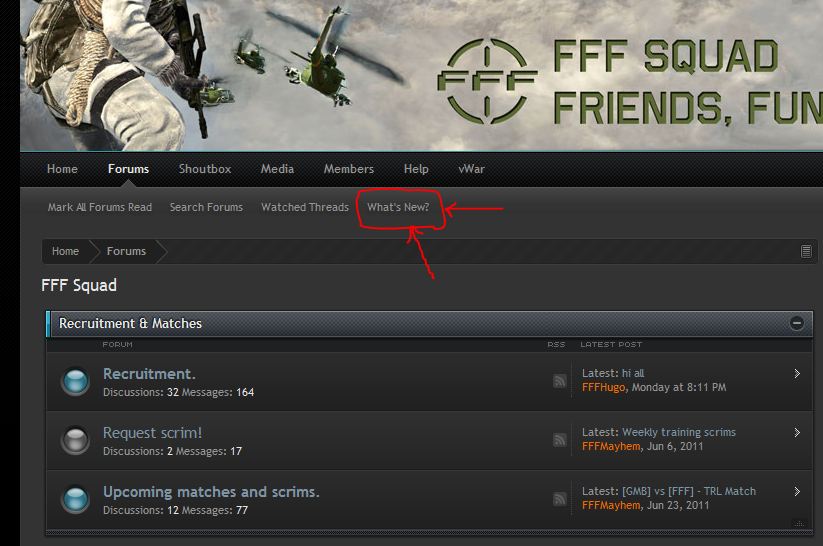
2. The What's New? button at the top of the page. If you click this it will bring you to a page with a full list of all the most recent threads, I would recommend using this when looking for a quick update. See images below:
Click on the 'What's new' button
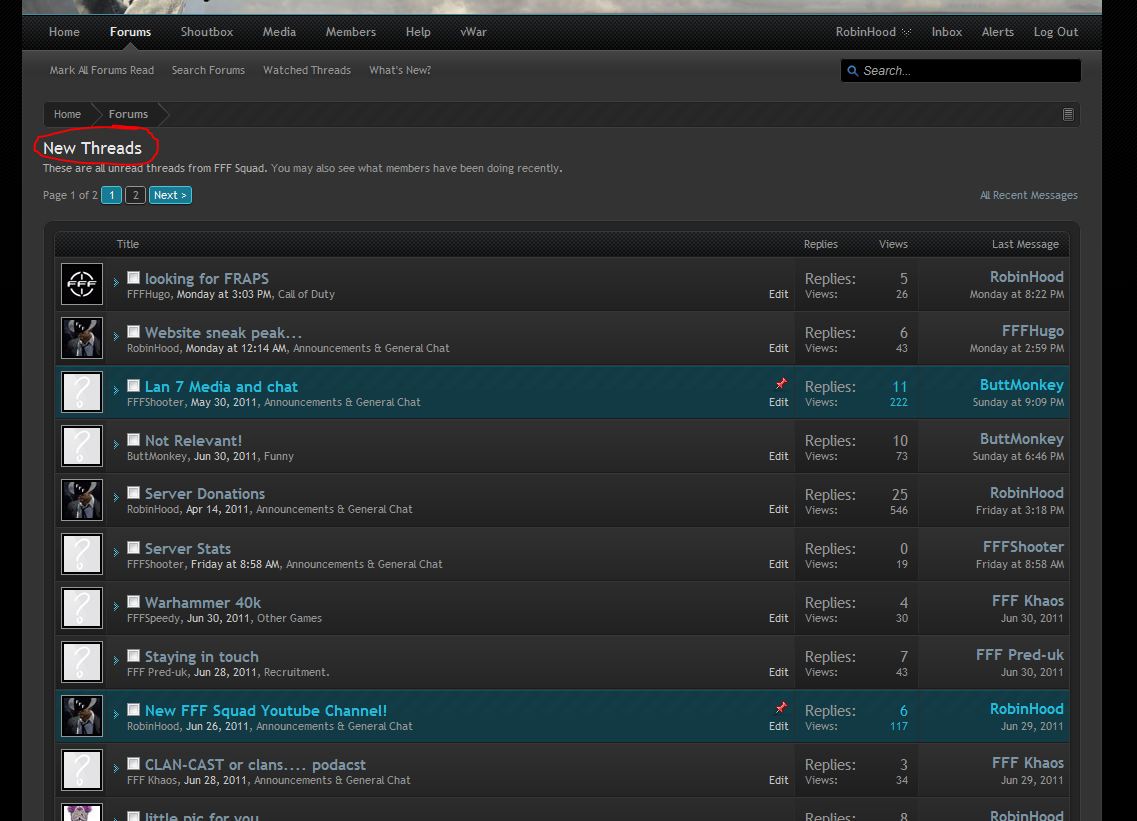
You'll get every single thread that's been updated since you last visited as below:
Alert System
There's an alert system built in where you'll get instant notification of updates to threads your taking part in, private messages received etc. so you don't have to check your email inbox for notifications all the time.
Media Section
See the link in the top navigation bar. Here you can watch all of the video from our YouTube channel and comment and discuss them using your forum and account.
Like Button
If you look on the bottom right hand corner of this and every other post (not yours) you should be able to see a like button for each post. You can use this to show appreciation for a post just like on facebook.
Shoutbox
This will be updated but has much more functionality than the old one with smilies and other stuff, it also has its own dedicated page now (see the navigation bar at the top of the screen) where you can view a large version like a chatroom.
You can edit your shouts when looking at the full page version, hover over the left edge of your shout and a drop down box should appear to edit or delete, if you don't see it let me know so I can check the permissions.
V Wars
This has been moved to the top navigation bar too, if you hover over it you will see the links to the other options such as joining matches, creating matches and challenges.
Still to come:
Trophies & Badges
This are custom logos that can be assigned to you beneath your avatar for achievements such as player of the month, length of time in the clan, training co-ordinator, clancast director etc.
Steam Integration
I'm trying to get some plugins that will link our steam group to the forum and display our collective stats as well as adding Steam profile info.
Further graphical enhancements
We now have much more control over the look of the site and how it's styled so we can change the banner as often as we like, add cool background images to wrap around the whole site etc. so any input as to ideas feel free to post up!
Lots of other things are also on the way that I'm still looking into
Also you'll all have to update your avatars, and your DOB will probably be wrong as they got messed up in the import. Click on my avatar, when the profile card comes up then click 'Start a Converstation' and send me your correct DOB so I can update it, unfortunately you can't do this yourself at the mo.
Big thanks to Storm3y for helping me get this sorted!
Right, I lost my intro post from last time so I'll whack it up again real quick. Some of the key features to keep an eye out for on the new site include:
Viewing all the recent threads
1. There's a box on the home page with about 5 recent threads on it for a quick glance. But for a full list where you won't miss any of them use...
2. The What's New? button at the top of the page. If you click this it will bring you to a page with a full list of all the most recent threads, I would recommend using this when looking for a quick update. See images below:
Click on the 'What's new' button
You'll get every single thread that's been updated since you last visited as below:
Alert System
There's an alert system built in where you'll get instant notification of updates to threads your taking part in, private messages received etc. so you don't have to check your email inbox for notifications all the time.
Media Section
See the link in the top navigation bar. Here you can watch all of the video from our YouTube channel and comment and discuss them using your forum and account.
Like Button
If you look on the bottom right hand corner of this and every other post (not yours) you should be able to see a like button for each post. You can use this to show appreciation for a post just like on facebook.
Shoutbox
This will be updated but has much more functionality than the old one with smilies and other stuff, it also has its own dedicated page now (see the navigation bar at the top of the screen) where you can view a large version like a chatroom.
You can edit your shouts when looking at the full page version, hover over the left edge of your shout and a drop down box should appear to edit or delete, if you don't see it let me know so I can check the permissions.
V Wars
This has been moved to the top navigation bar too, if you hover over it you will see the links to the other options such as joining matches, creating matches and challenges.
Still to come:
Trophies & Badges
This are custom logos that can be assigned to you beneath your avatar for achievements such as player of the month, length of time in the clan, training co-ordinator, clancast director etc.
Steam Integration
I'm trying to get some plugins that will link our steam group to the forum and display our collective stats as well as adding Steam profile info.
Further graphical enhancements
We now have much more control over the look of the site and how it's styled so we can change the banner as often as we like, add cool background images to wrap around the whole site etc. so any input as to ideas feel free to post up!
Lots of other things are also on the way that I'm still looking into
Also you'll all have to update your avatars, and your DOB will probably be wrong as they got messed up in the import. Click on my avatar, when the profile card comes up then click 'Start a Converstation' and send me your correct DOB so I can update it, unfortunately you can't do this yourself at the mo.
Big thanks to Storm3y for helping me get this sorted!
Attachments
-
 33.2 KB Views: 1,316